
Ages 5–13: Screen Free Coding Activities Parents Can Run With No Prep
Unplugged coding activities are hands-on, screen-free games that teach the same core concepts real programmers use: sequencing, conditionals, loops, debugging, and data representation. Kids act out instructions with cards, string, and everyday objects instead of typing them, which strips away the technical barriers and puts the logic front and center. You can run your first lesson in a short time with items already in your kitchen drawer. Start with the activity list below.
TL;DR:
- Unplugged activities teach core programming concepts like sequencing, conditionals, and loops using everyday objects, without any need for screens or devices.
- They are simple to set up with household items and are adaptable for children aged 5 to 13, with instructions scaled to different age groups.
- Real learning is observable through activities such as correctly recalling step order, predicting outcomes, and identifying errors, which can be checked with quick exit tickets.
- Connecting unplugged activities to block-based coding tools like Scratch helps children see the tangible link between physical instructions and digital commands.
- Ready-made kits and printable lesson plans are available to minimize prep time and facilitate smooth, engaging sessions across various age groups.
Table of Contents
- Unplugged Coding Activities Grouped by Core Concept
- Setting Up Unplugged Sessions So They Actually Run Smoothly
- Adapting the Same Activity Across Ages 5 to 13
- What Kids Actually Learn, and How to Check It
- Moving From Unplugged Play to Block-Based Coding
- Why Teamgeniussquad Builds Confidence Alongside Coding Logic
- A Facilitator’s Honest Take on What Actually Lands
- Get Prepared Kits and Lesson Plans Without the Prep Work
- Where to Find More Unplugged Lesson Plans
- Sources
Unplugged Coding Activities Grouped by Core Concept
Every activity below teaches one specific idea. Run them in this order, and your child builds a real mental model of how programs think before ever touching a keyboard.
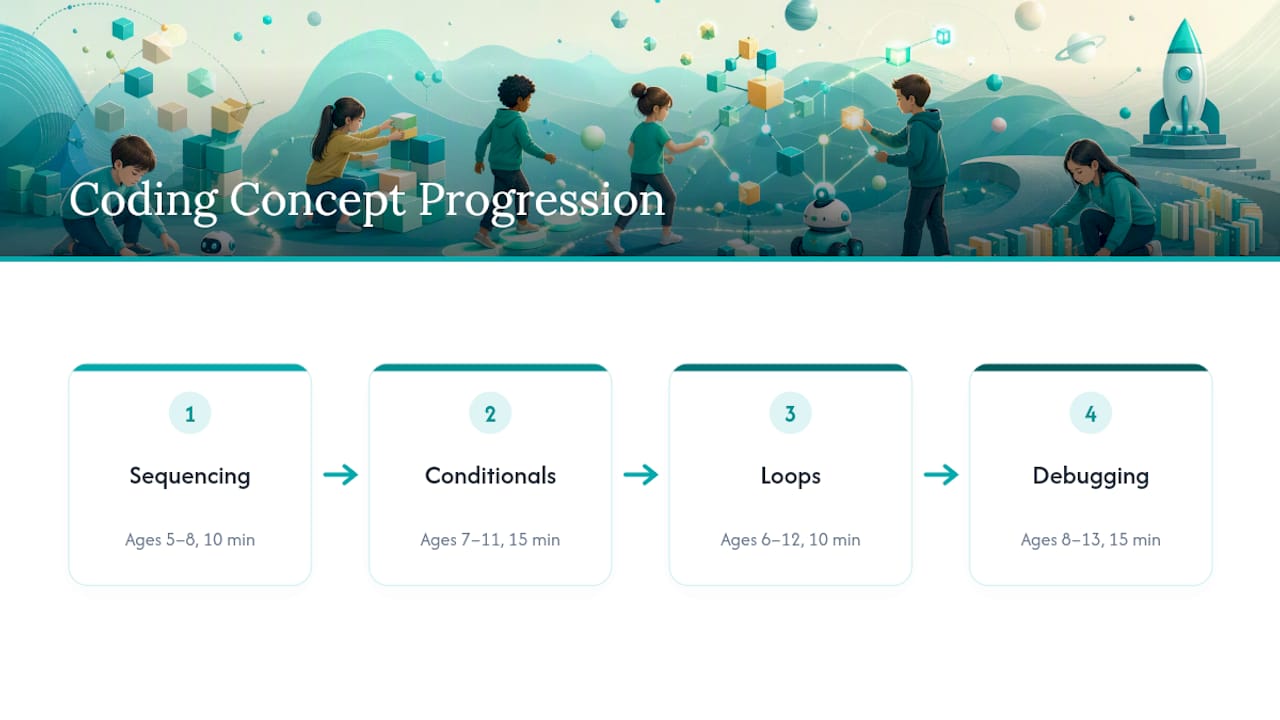
Sequencing: the peanut butter sandwich algorithm Ages 5–8. Materials: bread, peanut butter, a butter knife, a plate. Prep: 2 minutes. Run: 10 minutes. One child gives step-by-step instructions to make a sandwich while another follows them exactly, literally, including the mistakes. Ask them to write four steps on index cards first, then trade decks with a partner. Debrief: What happened when you forgot a step? Could the “computer” (the sandwich maker) guess what you meant, or only follow exactly what you wrote?
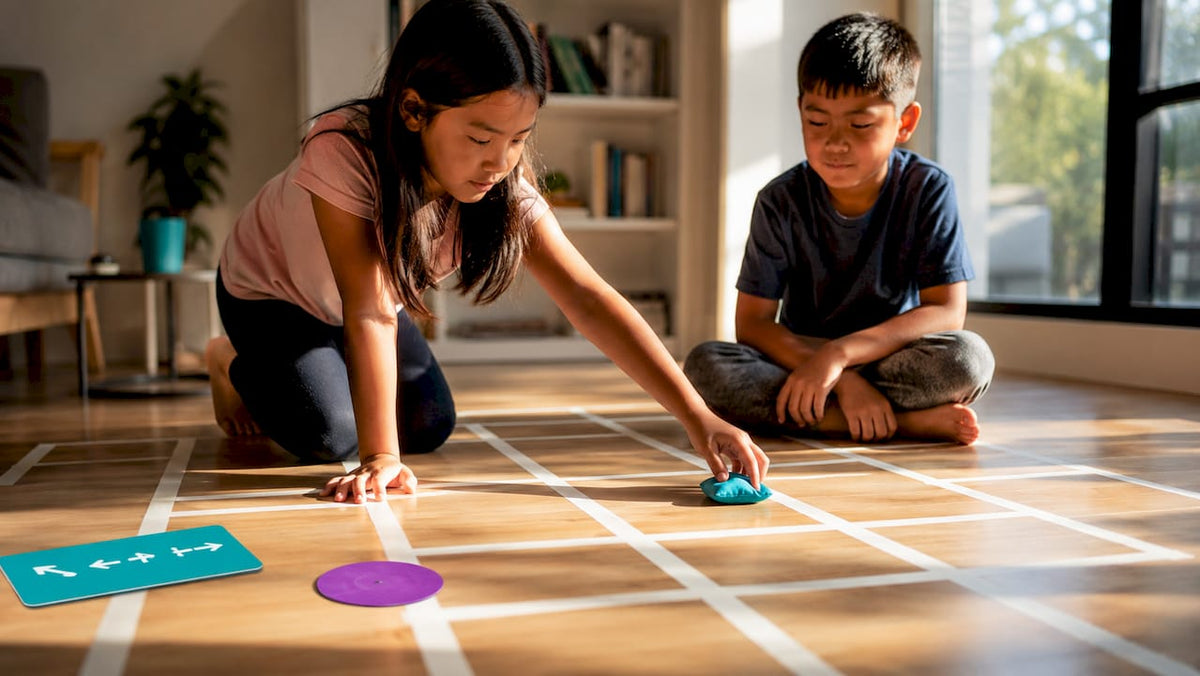
Sequencing: the human robot maze Ages 6–10. Materials: masking tape, a small toy or beanbag. Prep: 5 minutes to tape a grid on the floor. Run: 15 minutes. One player writes a path using only four commands (“forward,” “back,” “turn left,” “turn right”), then a blindfolded or eyes-closed partner walks it. Debrief: Which command sequence got the robot stuck? What would you add to the instruction set to make it more precise?
Conditionals: the “if this, then that” card game Ages 7–11. Materials: playing cards, paper strips for rules. Prep: 5 minutes. Run: 15 minutes. Write simple rules like “if the card is red, clap once; if it’s black, stand up.” Flip cards one at a time and follow the rule live. Debrief: What happens when two conditions could both be true? How does a program decide which rule wins?
Conditionals: weather dressing decisions Ages 5–8. Materials: printed weather cards (sun, rain, snow), a pile of clothing items or drawings. Prep: 10 minutes. Run: 10 minutes. Debrief: What rule did we forget that caused a wrong outfit choice?
Loops: the repeat-until dance Ages 6–12. Materials: none required. Prep: 0 minutes. Run: 10 minutes. Teach a four-move dance sequence, then call out “repeat 3 times” or “repeat until I say stop.” Debrief: How is a loop different from just writing the same steps four times? Why do programmers prefer loops?
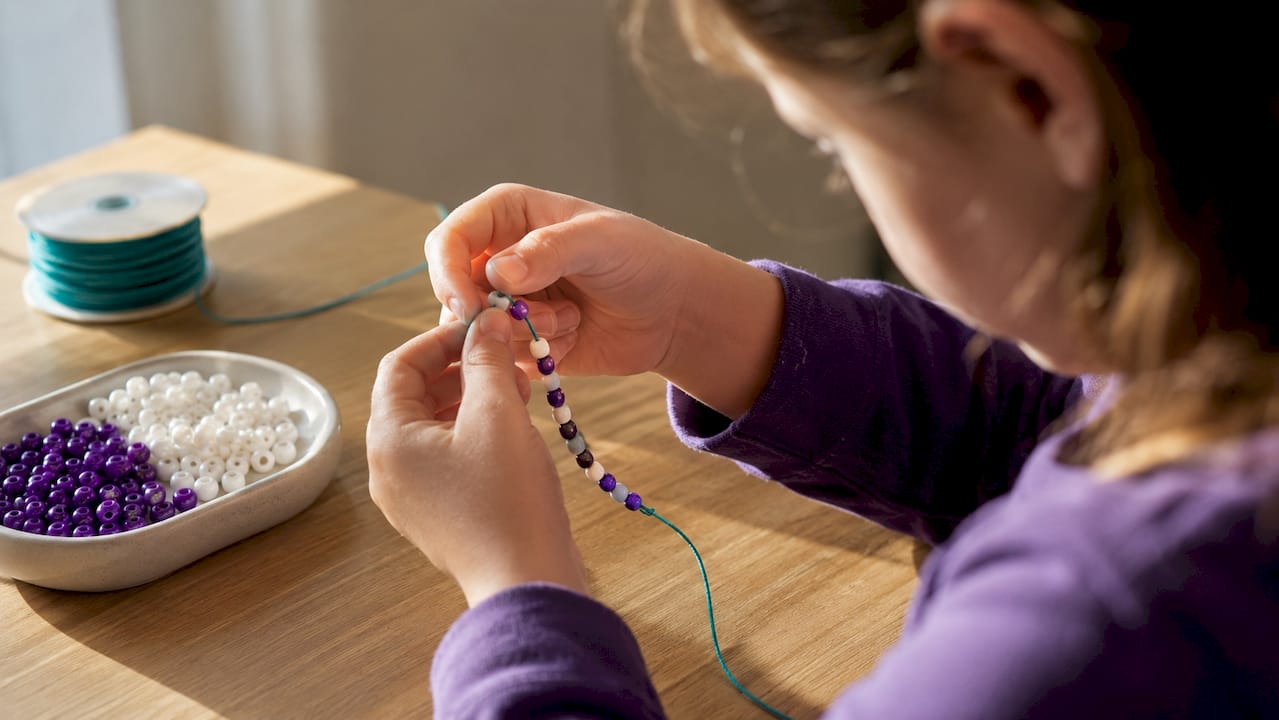
Loops: bead pattern bracelets Ages 8–13. Materials: string, colored beads. Prep: 5 minutes. Run: 20 minutes. Kids write a short pattern (“2 blue, 1 red, repeat 5 times”) on paper before a partner threads it. Debrief: What happens to the whole bracelet if one repeat count is wrong?
Debugging: fix the broken recipe Ages 8–13. Materials: an index card with an intentionally broken set of instructions (steps out of order, one missing, one contradictory). Prep: 5 minutes. Run: 15 minutes, team-based. Groups race to identify and correct every error before “running” the recipe out loud. This mirrors the relay-style debugging format in Code.org’s Hour of Code unplugged lessons, which use timed team runs to build debugging stamina.

Debugging: the silent instruction relay Ages 9–13, team-based. Materials: paper, pencils. Prep: 5 minutes. Run: 20 minutes. One team writes instructions for building a small object (a paper airplane, a block tower); another team executes them without asking questions, then reports back what failed. Debrief: Where was the instruction ambiguous rather than wrong?
Data representation: binary bracelets Ages 9–13. Materials: two bead colors, string, a printed ASCII or number chart. Prep: 10 minutes. Run: 20 minutes. Kids convert their name’s initial or age into binary and bead it out, one color for 0, one for 1. This activity closely mirrors the number-system lessons in Computer Science-in-a-Box, built for classroom use with children ages 9 to 14.
Data representation: 20 questions, binary style Ages 8–12. Materials: none. Prep: 0 minutes. Run: 15 minutes. Players can only ask yes/no questions to guess an object, and must track how few questions it takes. Debrief: How many questions does it take to find one item out of 16? Out of 32? What pattern do you notice?
Algorithms: sort the socks Ages 5–9. Materials: a pile of mismatched socks or colored blocks. Prep: 2 minutes. Run: 10 minutes. Kids sort items by size or color, then narrate their exact steps aloud, discovering they used a real sorting algorithm without knowing its name. Debrief: Could you write your sorting steps down so someone else could follow them?
Algorithms: shortest path treasure hunt Ages 10–13. Materials: a simple hand-drawn map with a grid, a small object as “treasure.” Prep: 10 minutes. Run: 20 minutes, solo or paired. Kids plot the fewest possible moves to the treasure, then compare paths with a partner to find an even shorter one. Debrief: Was the first path you found the best one? How do you know?
Pro Tip: Laminate your instruction cards once you build a set you like. The same peanut butter sandwich deck or binary bead chart can run a dozen more sessions across siblings, classrooms, or birthday parties without a single reprint.
Setting Up Unplugged Sessions So They Actually Run Smoothly
A screen-free lesson still needs real preparation. CS Unplugged’s own materials stress pre-arranged stations and clear instructions, because setup friction is the number one thing that kills momentum mid-activity.
Run through this before kids arrive:
- Pre-sort materials into labeled bags per activity, one bag per pair or team.
- Clear enough floor or table space for movement activities like the human robot maze.
- Set a visible timer for each activity; 10 to 20 minutes keeps energy high.
- Check for tripping hazards if the activity involves blindfolds or floor tape.
For grouping, pair younger children (ages 5–7) with an adult or older buddy, and let ages 8 and up work in twos or threes so debugging arguments happen naturally. Relay and team formats, like those in Code.org’s unplugged debugging lesson, work best with groups of four to six.
If a group finishes early, they’re bored, not lazy. Add a “repeat with double the steps” twist rather than moving to a new concept too fast. If instructions feel ambiguous, that’s often the lesson working exactly as intended. Ask the group to identify where the ambiguity lived.
Pro Tip: For neurodivergent learners, swap verbal-only instructions for a printed checklist with checkboxes. Kids with dysgraphia or processing differences often demonstrate the same conceptual understanding once the working-memory load of listening and tracking is removed.
Adapting the Same Activity Across Ages 5 to 13
The activities above don’t need to change. The instructions around them do.
For ages 5–7, shorten every instruction set to three or four steps, add a physical gesture for each command (clap for “loop,” stomp for “stop”), and keep every session under 15 minutes total. Expect success to look like following one clean sequence, not writing one.
For ages 8–10, introduce written “code” on index cards instead of spoken instructions, and let kids write their own broken recipe for a partner to debug. This age band handles four to six-step sequences and basic conditionals comfortably.
For ages 11–13, push toward abstraction: have kids write pseudocode for a process before acting it out, run small-group debugging races, and stack two concepts in one activity (a loop with a conditional inside it, for instance). Expect 20 to 30 minute sessions and genuine disagreement over the “best” solution, which is a good sign, not a management problem.
What Kids Actually Learn, and How to Check It
Each concept has an observable behavior you can watch for without any formal test. Sequencing shows up when a child can list ordered steps out loud without skipping one. Conditionals show up when they can correctly predict what happens under a rule change you didn’t announce. Loops show up when they use the word “repeat” instead of listing the same step five times. Debugging shows up when they can point to the exact broken instruction, not just say “it’s wrong somewhere.”
Quick exit tickets work well here: ask a child to draw the steps of today’s activity in order, or hand them a broken instruction card and time how fast they spot the error. Pairing an activity with a fast formative check like this produces real evidence of learning, a technique built into Code.org’s own unplugged lesson design. These activities align loosely with lesson repositories like CS Unplugged and Computer Science-in-a-Box, though running them at home doesn’t require any formal curriculum alignment.
Moving From Unplugged Play to Block-Based Coding
The bridge to a screen is shorter than most parents expect. Mirror one unplugged activity with one block-coding session in the same sitting: the human robot maze maps almost directly onto movement blocks in tools like Scratch, and the repeat-until dance maps onto a loop block by name. Point out the connection explicitly, “this stack of blocks is the same as our dance instructions,” so the abstraction doesn’t feel like starting over.
Pair kids at the keyboard for the first few sessions to cut device overwhelm; one child drives while the other reads the plan aloud. Stick with block-based tools until a child is comfortable predicting what a loop or conditional block will do before running it. Save syntax-based coding (Python, JavaScript) for once that prediction skill is solid, usually somewhere around ages 10 to 13, though every child moves at their own pace.
Why Teamgeniussquad Builds Confidence Alongside Coding Logic
Unplugged coding activities work best when confidence-building happens alongside the logic. Some screen-free STEAM kits for kids ages 5–13 use a method called the E³ Method: Engage, Encourage, Empower. These kits may be designed to lean tactile and visual rather than text-heavy. Each one pairs hands-on experiments with reading, writing, and reflection, treating literacy and logic as one connected skill rather than two separate subjects.
A Facilitator’s Honest Take on What Actually Lands
The sessions that work best aren’t the cleverest ones. They’re the ones with the shortest instructions and the fastest “aha” moment, usually the sandwich sequencing game or the broken recipe debug. Kids remember the frustration of a bad instruction more than any lecture on what debugging means. Start there, and check the lesson plans page for age-sorted printables if you want a head start.
— Tita
Get Prepared Kits and Lesson Plans Without the Prep Work
Every activity above works with items from your kitchen drawer, but if you’d rather skip the bag-sorting and card-printing, some kits arrive with sequencing cards, materials, and debrief questions already built in, so setup time can drop significantly.

The kits use the same E³ Method structure behind every unplugged concept above, just packaged so you open a box instead of raiding the pantry. If you want a broader set of age-differentiated activities beyond what’s covered here, the lesson plans page has printable, ready-to-run sessions organized by age band. Browse the current kit lineup at the Teamgeniussquad shop and pick one that matches the concept your child is working on next.
Where to Find More Unplugged Lesson Plans
Three collections are worth bookmarking once you’ve run through the activities above. CS Unplugged offers free, printable activities covering every concept in this guide, built to remove technical distractions entirely. Computer Science-in-a-Box packages classroom-ready lessons on number systems and algorithms for ages 9 to 14. Code.org’s Hour of Code unplugged PDF adds relay-style team activities for debugging practice. Pick one or two activities to start, run them once, and adjust based on what your kids actually latch onto rather than trying to cover everything in a single sitting.
Sources
- Computer Science-in-a-Box: Unplug your curriculum – NCWIT
- Classic CS Unplugged
- Hour of Code | Unplugged (Code.org PDF)



Leave a comment
This site is protected by hCaptcha and the hCaptcha Privacy Policy and Terms of Service apply.